

Reports and analytics
Hospital reports you build yourself and receive on schedule.
SeltenONE HMS lets administrators build reports on hospital data with their own filters, columns and charts, export them, and schedule them for the people who need them, alongside live dashboards for each role.
- Report builder with filters, columns, sorting and charts
- Export to CSV, Excel (XLSX) or PDF
- Daily, weekly or monthly report schedules
Reports benefits
From end-of-day tallies to a shared view.
Answers without a spreadsheet
Build the report you need from the data already in the HMS.
The same numbers for everyone
Departments and management read from one source.
Reports that arrive
Schedules send reports on the day and time you set.
The day at a glance
Dashboards show today's queue, appointments and completions.
Report builder
Build reports on any module.
Pick the module, choose filters and columns, set the order and add a chart, then save the report for reuse.
Choose a module
Report on appointments, visits, invoices, pharmacy and other HMS modules.
Filters and columns
Narrow the data and choose exactly which fields appear.
Sorting and charts
Order results and add a chart to show the trend.
Saved reports
Save reports so the team can run them again.
Export and schedules
Reports in the format and at the time you need.
Export any report on demand, or schedule it to run on its own.
CSV, Excel and PDF export
Download a report as CSV, XLSX or PDF.
Report schedules
Run a report daily, weekly or monthly at a set time.
Recipients
Choose which users receive each scheduled report.
Pause and resume
Pause a schedule without deleting it.
Live dashboards
A dashboard for every role.
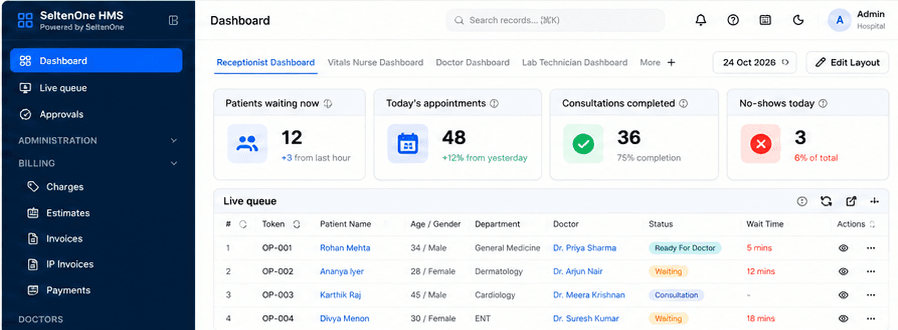
Reception, nursing, doctors and lab each have a dashboard with the counters that matter to them.
Role-based dashboards
Receptionist, vitals nurse, doctor and lab technician dashboards.
Daily counters
Patients waiting, today's appointments, consultations completed and no-shows.
Editable layouts
Arrange the dashboard layout to suit how the team works.
Module summaries
Invoice, visit, prescription and admission summaries beside each list.
See your hospital's numbers in SeltenONE HMS.
Walk through the report builder, schedules and role dashboards with our team.
Frequently asked questions
Questions about HMS Reports.
Yes. The report builder lets you choose a module, filters, columns, sorting and a chart, and save the report for reuse.
Reports can be exported as CSV, Excel (XLSX) or PDF.
Yes. Report schedules run a saved report daily, weekly or monthly at a set time for the users you choose, and can be paused.
Yes. There are dashboards for roles such as receptionist, vitals nurse, doctor and lab technician, each with its own counters.
Start with a better operating view
See your hospital's numbers in SeltenONE HMS.
Walk through the report builder, schedules and role dashboards with our team.