

Appointments and live queue
Appointments, tokens and follow-ups from one front desk.
SeltenONE HMS gives reception one place to book appointments, issue tokens, check patients in and plan follow-ups, while doctors and waiting areas follow the same live queue.
- Appointment statuses from scheduled to checked in
- Token queue boards for OPD, pharmacy, lab and wards
- Follow-ups and visits on the same patient record
Appointments benefits
A calmer start to every consultation.
One schedule for desk and doctor
Reception books against doctor slots, and the consultation room sees the same list.
A visible waiting area
Patients see their token called on a screen instead of asking the desk again.
Follow-ups that are tracked
Return visits are recorded as follow-ups, not left to memory or paper slips.
Visits that start with context
A checked-in appointment becomes a visit on the patient's existing record.
Booking and scheduling
Book against real doctor availability.
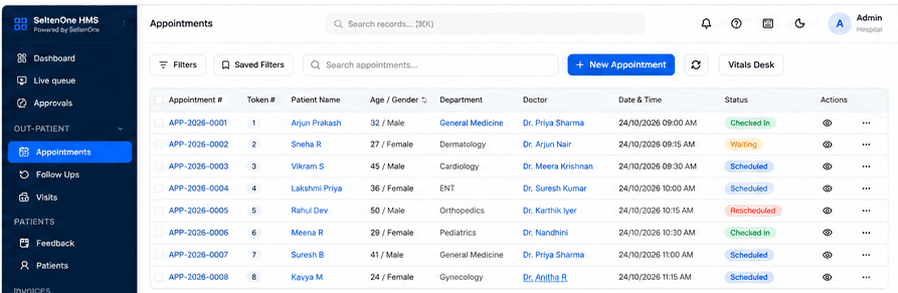
Every appointment carries its department, doctor, date, time and token number, and moves through clear statuses as the day runs.
Appointments
Create appointments with a department, doctor and time slot. Each one gets an appointment number and a token.
Doctor slots, shifts and leave
Doctor profiles hold shifts, bookable slots and leave, so reception books times the doctor is actually in.
Appointment statuses
Track each booking as scheduled, checked in, waiting or rescheduled, and see no-shows on the dashboard.
Filters and saved views
Filter by doctor, department, date or status, and save the views your desk uses every day.
Live queue and display boards
One live queue, shown where patients wait.
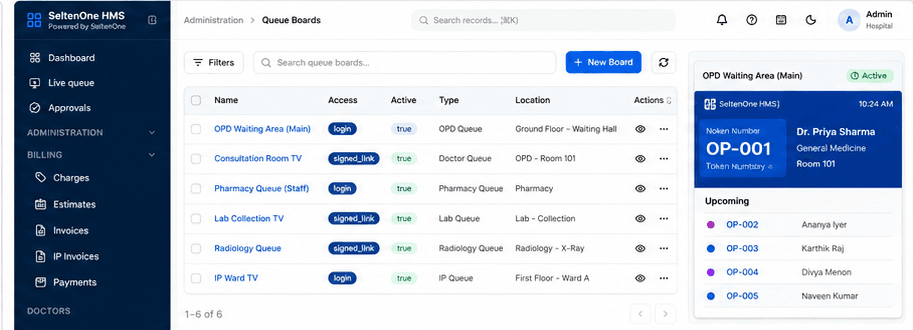
The live queue follows each token from waiting to consultation. Queue boards put the current and upcoming tokens on screens across the hospital.
Live queue
See token, patient, department, doctor, status and waiting time for everyone in the queue.
Queue boards
Set up boards for an OPD waiting hall, a consultation room, pharmacy, lab collection, radiology or an IP ward.
Board access
Open a board on a TV with a staff login or a signed link, depending on where the screen sits.
Now serving and upcoming
Each board shows the token being served, the doctor and room, and the tokens that come next.
Visits and follow-ups
From check-in to the next appointment.
Check-in, vitals, consultation and follow-up stay on the same patient record, so the next visit starts where the last one ended.
Vitals desk
Nursing staff record vitals before consultation from a dedicated vitals desk and dashboard.
Follow-ups
Plan and track return visits as follow-ups instead of separate, unlinked bookings.
How it works
How an outpatient day flows.
Each step updates the same appointment and patient record.
Book
Reception books a slot and issues a token.
Check in
The patient arrives and is marked checked in.
Vitals
Nursing records vitals at the vitals desk.
Queue
The token appears on the live queue and boards.
Consult
The doctor sees the patient as a visit.
Follow up
A return visit is planned as a follow-up.
See your front desk running on SeltenONE HMS.
Walk through booking, check-in, the live queue and queue boards with our team.
Frequently asked questions
Questions about HMS Appointments.
Yes. Queue boards show the token being served and the upcoming tokens. You can set up separate boards for areas such as the OPD waiting hall, consultation rooms, pharmacy, lab collection, radiology and IP wards.
Doctor profiles hold shifts, appointment slots and leave, so the front desk books against the times each doctor is available.
Follow-ups are recorded as their own module and linked to the patient, so return visits can be planned and reviewed.
SeltenONE HMS can send patients appointment reminders on WhatsApp. The demo shows how reminders fit into your booking workflow.
Start with a better operating view
See your front desk running on SeltenONE HMS.
Walk through booking, check-in, the live queue and queue boards with our team.